Apple Mac mini (M6) review: The best compact desktop is no longer a great deal - Engadget
tags:At $899, the new Mac mini loses the fun factor of the previous models.
Devindra Hardawar for Engadget
RATING : 8.7 / 10
- Powerful M6 chip
- Sturdy and compact design
- Useful ports
- Much more expensive than previous gens
- Power button on the bottom
- Pricey memory and storage upgrades
When we last reviewed the Mac mini in 2024, Apple was sitting pretty with a compact redesign and a surprisingly affordable $599 starting price. And then, the AI frenzy begat the RAMaggedon. Mac minis flew off the shelves (we never got an M5 version), while storage and memory prices exploded. Now we have the M6 Mac mini, which still has a wonderfully small case, but starts at $899. That's not so adorable, is it?
The M6 Mac mini remains a very powerful and compact desktop, but it's no longer the shockingly great deal that it used to be. It wasn't unusual to see earlier models go on sale for $499 or less, making them perfect servers, sturdy computers for kids or AI dev boxes. Now the Mac mini just seems a lot less fun. But if you absolutely need a powerful little system, it's still the best mini desktop you can buy today.
What's notable in the Mac mini M6?
Devindra Hardawar for Engadget
After skipping the base M5 chip last year, the new Mac mini lineup is a bit confusing. You can choose from either the new M6 chip, a 12-core CPU/12-core GPU system on a chip, or the more powerful M5 Pro, sporting up to 18 CPU cores and 20 GPU cores. They both offer vastly different RAM capabilities: The M6 supports up to 32GB of RAM with 170 GB/s of bandwidth, while the M5 Pro goes all the way up to 64GB with 307 GB/s of bandwidth.
Despite the numbering confusion, Apple is sticking with its classic split for the Mac mini. Most people would be fine with the $899 M6 model — but if you're actually doing serious work that requires massive files and rendering, the M5 Pro model would be far more capable. And if you need more power, you can jump all the way up to the $2,499 Mac Studio, which now has replaced the older Mac Pro desktops.
The biggest upgrade with the new hardware, according to Apple, comes down to local AI processing. Apple claims the M6 model is 13.5x faster than the M1 when it comes to LLM prompt processing in LM Studio, while the M5 Pro system is 22.3x faster. There are notable gains in typical performance too. The company says the M6 is 2.3x faster at Excel spreadsheet work than the M1 Mac mini, and the M5 Pro is 4.6x quicker. Those are worthwhile improvements to see after six years of steady Apple Silicon improvements, but they're not double-digit figures like the AI processing.
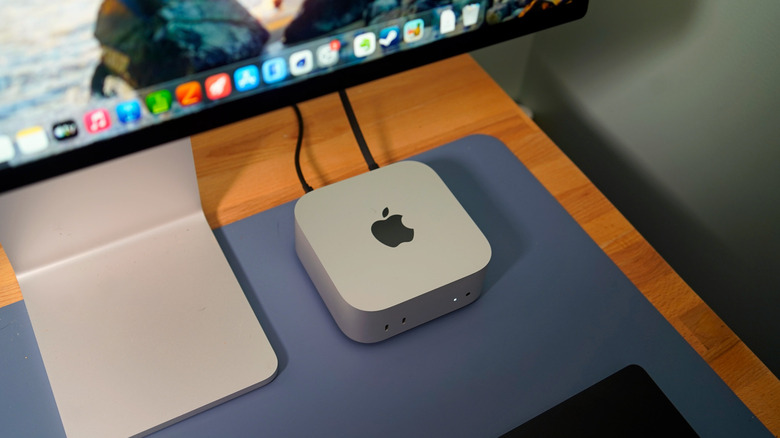
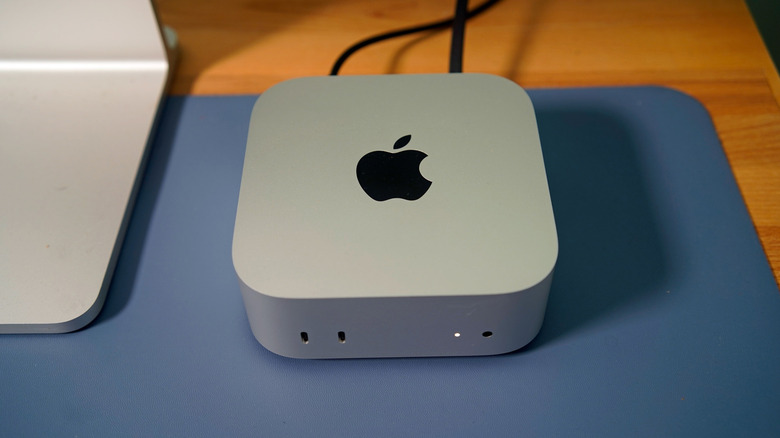
The new Mac mini has the same adorable five-inch by five-inch case as the previous model, and it's still shockingly small in person. At just 1.5 pounds, it looks and feels more like an over-sized Apple TV than a genuine computer. Given just how much of an achievement that this design was a few years ago, I don't blame Apple for not changing a thing.
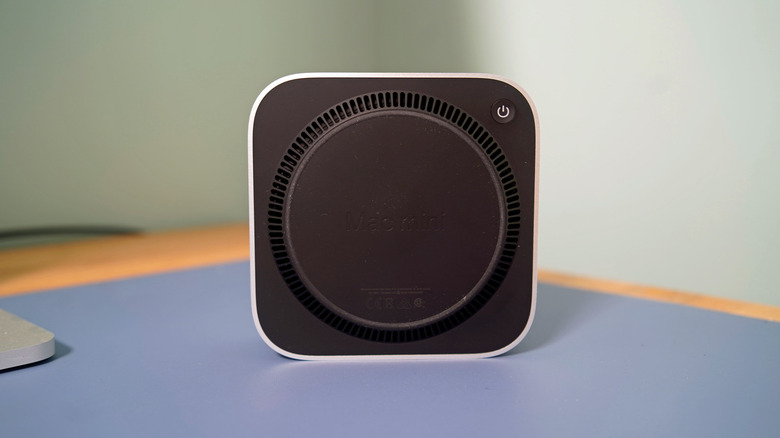
The only unfortunate aspect of this design is that the power button still sits at the bottom of the Mac mini, right beside its rear ports. That makes it tough to hard reset the system if it's living in a far corner of your desk. For general usage, though, it's not a huge deal. Apple's Magic keyboards, and most other Mac keyboards, have power buttons in the top row of keys.
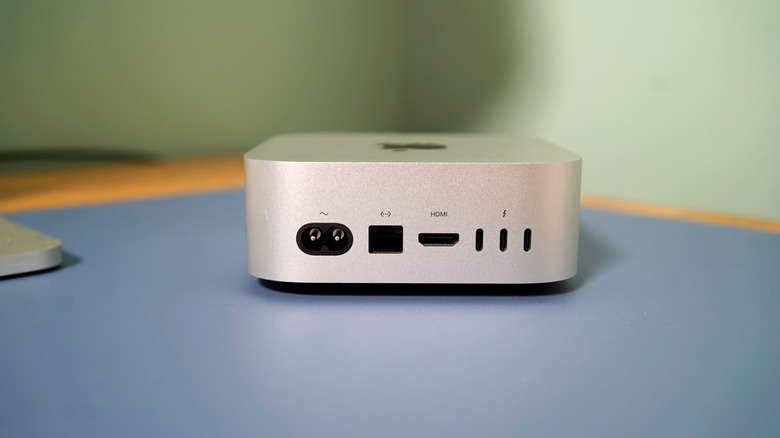
As for ports, the Mac mini has two USB-C USB 3.0 ports up front, along with an HDMI connection, 2.5 Gbps Ethernet jack, power port and three USB-C Thunderbolt ports on the rear. The M6 Mac mini features Thunderbolt 4, with up to 40 Gb/s connections, while the M6 Pro system has Thunderbolt 5, supporting up to 120 Gb/s. The latter would be better for fast connections to storage and other accessories. It would be nice to see an SD card slot somewhere on the Mac mini, at least on the M5 Pro model, but for now you'll have to step up to a Mac Studio if you want one.
In-use: The best Mac mini yet
Devindra Hardawar for Engadget
Given all of the impressive progress made with Apple Silicon over the past six years, I didn't expect the new Mac minis to disappoint me in any major way. Our review unit, which was equipped with an M6 chip, 24GB of RAM and a 1TB SSD, was 16.5 percent faster than the previous M4 Pro Mac mini in the Geekbench 6 single-threaded CPU benchmark. That older system still had a slight edge in the multi-threaded test, but that's because the M4 Pro chip is more meant for prosumers, instead of the more mainstream M6.
Our review unit was only 6 percent faster than the M5 MacBook Pro in Geekbench's single-threaded benchmark, and it was 18 percent faster in the multi-threaded test. The Mac mini M6's Geekbench 6 GPU score was also 30 percent higher than that M5 MacBook Pro, which points to some serious graphics upgrades this generation.
So sure, the M6 chip is indeed very fast. Most people won't be looking at benchmark stats, though. During my everyday computing work, which involves having tons of tabs open across several browsers, taking tons of video calls, juggling conversations in Slack and editing photos, the Mac mini was an absolute champ. I also never encountered the loud fan noise I noticed on the M4 Pro Mac mini, which sometimes spun up while I was running Cinebench tests and other heavy-duty tasks.
As for gaming, the M6 was able to run Cyberpunk 2077 at an average of 55 fps in 1080p with the default Mac graphics settings. Stepping down the graphics settings a bit got me to a smooth 60 fps. Lies of P, meanwhile, ran at 70 fps in 1440p with maxed-out graphics settings. I'd expect far better performance from the M5 Pro model's increased GPU cores and faster memory bandwidth. I wouldn't expect anyone would get a Mac mini to do some serious gaming, but it's always nice to have the option.
The M6 Mac mini took 18 seconds to transcode a 4K clip into 1080p, which is a slight step up from the 23 seconds it took the M5 MacBook Air. That's a great figure in general — it's even better than the ASUS ProArt PX16, one of the fastest Windows systems we've tested this year.
Should you buy the Mac mini M6?
Devindra Hardawar for Engadget
If you absolutely need a decent Mac desktop today, the Mac mini M6 remains the system to beat for most people. It's fast, adorably compact and it'll tackle just about everything you need. It's just a shame that it's no longer the incredible deal like the previous generations, though. At $899 — oh so close to $1,000 — the Mac mini M6 feels more like a serious purchase. Before, it just seemed like a great little system for minor projects.
I'd also recommend being wary of upgrading memory on any of the Mac mini models, as Apple is once again charging way too much. It costs you an additional $200 to get to our review unit's 24GB of RAM, and getting up to 32GB costs $400, bringing the Mac mini to $1,299. At that point, you might as well jump to the $1,699 M5 Pro model, which comes with 24GB of RAM and will be much faster for intensive projects.
Wrap-up
Maybe one day, the Mac mini will creep back down to $599 — but it will likely be years before that happens. For now, it's the cheapest entry into the world of Mac desktops, in an era where everything is overpriced.